

When starting packaging design, the two most frequently confused concepts are graphics and structure; this is precisely where the question what is box graphics comes into play. Box graphics is the arrangement of the logo, color, text, imagery, and other brand elements that will appear on a box's surfaces in a way that is compatible with the box's opening-closing and manufacturing structure. Good box graphics not only look nice on screen, but after printing and cutting they appear on the correct surfaces in a legible and producible way.
The real decision is this: does the design look impressive only on a monitor, or does it retain its function when the box is folded and the product is placed inside? In this guide, we help you separate graphic design from the box's structural drawing, prevent critical pre-press errors, and make the right decisions for your brand. At Kosapack, we carry out structural design, graphic design, prototyping, and color-accuracy approved proofing under one roof; this guide summarizes the fundamental logic we frequently explain during that process.
Table of Contents
Box graphics and box structure are not the same thing
Box design is created by two components working together, and confusing them is the source of the most expensive pre-press errors. Structural design determines the box's form, dimensions, panels, and how it will be folded and assembled. Graphic design, on the other hand, defines how the logo, text, color, pattern, and imagery will be placed on these panels.
The technical drawing that connects these two to production is called a dieline. The dieline is the box's two-dimensional production template; it shows the cutting, folding, gluing, and the areas where the printed content will be placed. In 3M's packaging dieline document, the dieline is also defined as a design template that supports the correct placement of printed content and shows cutting and folding lines as well as print boundaries.
That's why graphic work must always be prepared on the correct dieline. Creating a design while thinking only about the front face of the box leads to patterns breaking on the side panels, text falling on a fold line, or a logo disappearing in the glue area. A composition that looks flawless on screen may lose its alignment on the folded box.
How does box graphics become production-ready?
Graphic design is placed onto the surfaces in the box dieline, and each surface may have a different purpose. While the brand and product name stand out on the front face, product information may appear on the side face, and a message or pattern on the inner surface. The transitions of the design between these surfaces must look consistent even when the box is folded.
In the production drawing, three areas are critical in terms of graphics. The cutting line is the boundary that defines the box's outer form. The folding line shows where the material bends to take the box form. The glue area, on the other hand, is reserved for assembling the box; placing important graphic elements here causes visibility or production problems.
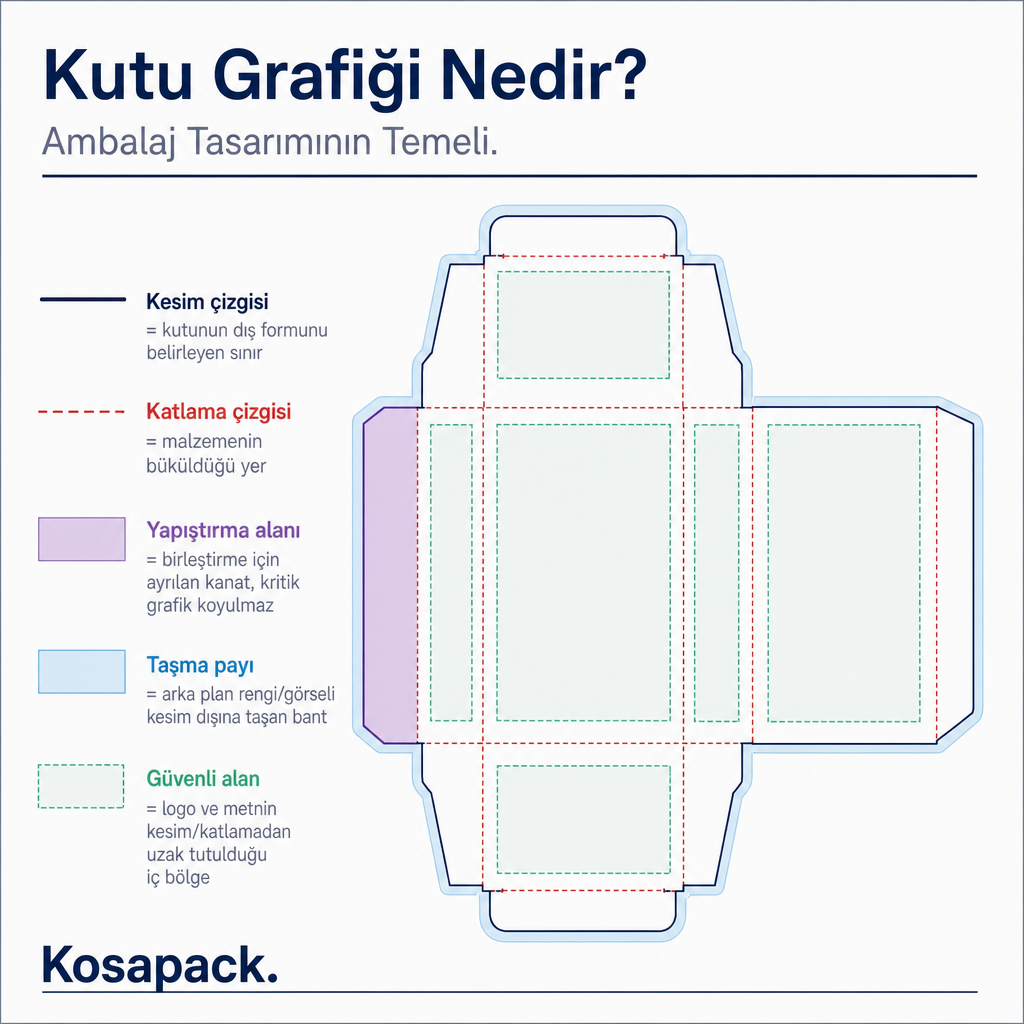
In addition to these, two concepts determine graphic quality. Bleed is the area where background colors or images are extended beyond the cutting boundary; it reduces the risk of small shifts that may occur during cutting leaving a white gap at the edge. Safe area, on the other hand, is the inner region that prevents critical elements such as the logo and text from getting too close to the cutting or folding lines. Bleed and safe area dimensions should not be assumed to be the same for every job; the technical values in the manufacturer's dieline for that box should be followed. In practice, this means that the same logo can be placed with a different safe area margin on a small jewelry box versus a large cardboard box; rather than assuming the measurement is standard, it should be verified in each job's dieline.
Design decisions are made according to the box's use
In box graphics, the first question should not be "Which color is nicer?" but "Where and how will this box be used?" The usage scenario determines the surface hierarchy and which information will stand out from the very beginning.
For shelf or store display, the product name and brand identity are arranged to be noticed from a distance. For e-commerce shipping, graphic decisions are considered together with the box's handling and opening experience; as important as the outer surface is the first surface seen when opened. In boxes intended for gift and premium presentation, the inner surface, the opening sequence, and the appearance of the product inside the box are also part of the design.
The product form also affects placement. Large text blocks in a small jewelry box can overshadow the perception of the product; in a cosmetics box, the product name and variant information need to be easily distinguishable. These are not immutable rules, but design decisions that need to be tested according to the targeted user and sales channel. For category-specific details, you can check out our guide to jewelry box production for brands and our luxury gift box production guide.
The box type also changes the graphic area and the technical approach. While work is done on the dieline of the panels in a folding carton box, for a cardboard box wrap, in addition to the outer surface, the edge turns and inner presentation are taken into account. In a corrugated box intended for shipping, the graphic is evaluated together with the box's protection and logistics role; the print resolution and rough texture of the corrugated surface cause fine details to remain limited. Clarifying the box type early from this perspective places graphic precision within a realistic framework.
What checks should be done before printing?
Before sending to production, testing the box graphics under a few clear headings prevents costly reprints. The following checks show whether the file is ready for production before moving to the proof stage.
- Is the correct dieline being used? Dimensions and panel placement should match the selected box structure exactly.
- Is important content in the right place? Logo, product name, barcode, and mandatory text should stay away from the cutting, folding, and glue areas.
- Do the backgrounds extend into the bleed area? For colors and images that go all the way to the edge, the bleed margin specified by the manufacturer should be applied.
- Do all panels read together? In the folded state of the box, text orientations, pattern transitions, and brand visibility should be checked.
- Has the design been examined at actual scale? The on-screen preview alone does not verify the legibility of small text or the placement on the box.
A common risk is preparing the design before the structural drawing is finalized. When dimensions or panel positions change, the graphic requires repositioning, and this pushes back the schedule. Another risk is checking the design only as a flat dieline: a pattern that looks neat in the flat view may lose its alignment when the box is folded. For this reason, we do the final check over the final state of the technical template and the approved proof; color accuracy and structural compatibility can only be reliably evaluated at this stage.
Sustainability is not just about material
Paper and cardboard packaging may be recyclable; however, it is equally important that the raw material comes from responsible sources. The Forest Stewardship Council (FSC) points out that, besides being recyclable, paper and cardboard packaging can be associated with deforestation and illegal logging when responsible source selection is not made.
For this reason, when evaluating material and print choices, it is necessary to consider not only the appearance but also the sourcing information, recycling expectation, and the box's intended use together. Being "paper-based" alone does not answer all sustainability questions. When we keep graphic decisions and material decisions at the same table, a box that is both strong on the shelf and defensible on the supply side emerges.
The right starting point for your brand
Box graphics is the packaging design that brings the brand's visual language together with the box's structure and production requirements. The basic rule is clear: prepare the graphic on the correct dieline; take into account the cutting, folding, gluing, bleed, and safe areas from the very beginning of the design. This way, the design serves its purpose not only on the screen but also on the produced box.
If you are evaluating a box form, wrap structure, or print approach for your brand, advancing structural and graphic design together is the safest path. Share your product's dimensions, sales channel, target perception, and quantity expectations; let's design the suitable dieline and graphic placement together.
Frequently Asked Questions
Are box graphics and packaging graphics the same?
Box graphics refers to the visual design used on the surfaces of box packaging. Packaging graphics is a broader concept and can also cover packaging forms other than boxes.
When should box graphics design be started?
It should be started when the box structure and dimensions are clarified. If the design is prepared on the manufacturer's up-to-date dieline, the graphic matches the actual panels and production boundaries.
Is the bleed margin the same for every box?
No. The required value is determined according to the box structure, the production method, and the manufacturer's technical drawing. Instead of applying a general measurement to every project, base it on the value in the relevant production template.
Does box graphics design replace production approval?
No. Graphic design, the technical template, and production approval are stages that complement each other. The check carried out over the approved technical drawing or proof helps evaluate placement and production compatibility.